 Today we just wanted to recap about 13 Common Mistakes in Logo Design and How to Avoid Them
A well-designed logo is essential for any business, large or small. It's the first impression that potential customers will have of your company, so it's important to make sure that it's a good one! In this blog post, we will discuss 10 common mista...
Read more:
https://www.siennapacific.com/blog/tips/common-mistakes-in-logo-design/?feed_id=721&_unique_id=63e7b96257f0d
Showing posts with label TipsAdvice. Show all posts
Showing posts with label TipsAdvice. Show all posts
Saturday, February 11, 2023
13 Common Mistakes in Logo Design and How to Avoid Them
Today we just wanted to recap about 13 Common Mistakes in Logo Design and How to Avoid Them
A well-designed logo is essential for any business, large or small. It's the first impression that potential customers will have of your company, so it's important to make sure that it's a good one! In this blog post, we will discuss 10 common mista...
Read more:
https://www.siennapacific.com/blog/tips/common-mistakes-in-logo-design/?feed_id=721&_unique_id=63e7b96257f0d

Friday, January 20, 2023
Woven Labels Design Do's and Don'ts: Avoid Common Mistakes
Designing custom woven labels for your new clothing brand is an important step in creating a professional and cohesive image for your brand. However, it can also be easy to make mistakes that can negatively impact the effectiveness of your labels. In this article, we will discuss some design do's and don'ts to help you avoid common mistakes when creating custom woven labels for your clothing brand.
Do's
- Keep it simple: One of the most important things to keep in mind when designing custom woven labels is to keep them simple. Avoid using too many different colors or fonts, as this can make your labels appear cluttered and unprofessional. Stick to a simple color scheme and font that is easy to read and represents your brand well.
- Use high-quality images: If you plan to include images on your custom woven labels, make sure to use high-quality images that are clear and easy to read. Low-quality images can make your labels appear cheap and unprofessional.
- Pay attention to the details: When designing custom woven labels, it's important to pay attention to the details. Make sure that your labels are properly aligned, that the text is centered, and that there are no typos or spelling errors. These small details can make a big difference in the overall appearance of your labels.
- Consider the size and shape: The size and shape of your custom woven labels can also play a big role in their effectiveness. Make sure to choose a size and shape that is appropriate for your clothing items and that will be easy to read.
- Use a good quality thread: Woven labels are made by weaving threads together to create an image, it's important to use good quality thread that is durable and long-lasting.
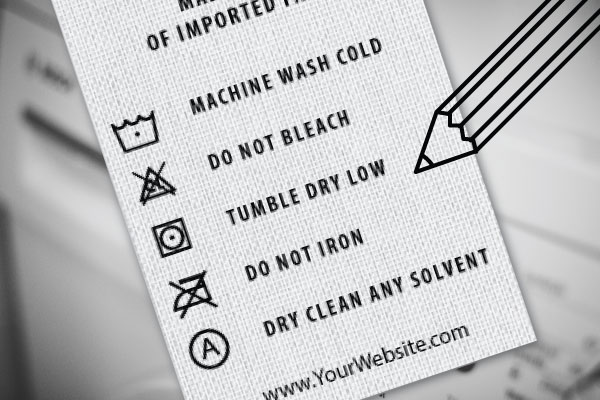
Don'ts
- Don't use too many colors: As mentioned earlier, it's important to keep your custom woven labels simple. Using too many different colors can make your labels appear cluttered and unprofessional. Stick to a simple color scheme that represents your brand well.
- Don't use hard-to-read fonts: When designing custom woven labels, it's important to choose a font that is easy to read. Avoid using fancy or hard-to-read fonts, as this can make your labels difficult to read and understand.
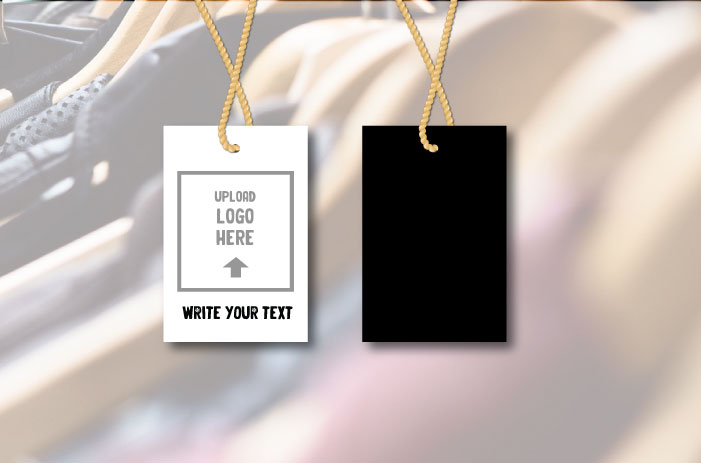
- Don't neglect the back of the label: Many people make the mistake of only focusing on the front of their custom woven labels and neglecting the back. However, the back of your labels is just as important as the front, and should be designed with care.
- Don't copy other brands: It's important to create a unique image for your brand. Avoid copying other brands or using images or designs that are similar to those used by other companies.
- Don't skimp on the quality of the label: Creating custom woven labels is an investment, it's important to use a reputable and experienced label manufacturer that use high-quality materials and advanced manufacturing techniques to produce durable and long-lasting labels.
In conclusion, designing custom woven labels for your new clothing brand is an important step in creating a professional and cohesive image for your brand. By following the do's and don'ts discussed in this article, you can avoid common mistakes and create labels that effectively represent your brand and stand out from the competition. Remember, custom woven labels are the first thing a customer will see, so it's important to make sure that they are of high quality and that they are designed to make a good first impression.
https://www.siennapacific.com/blog/tips/design-dos-and-donts-avoid-common-mistakes-in-woven-labels/?feed_id=673&_unique_id=63cb2770612d5Tuesday, October 18, 2022
Design the Perfect Sheriff Badge: 12 Templates to Get You Started

Looking to design a Sheriff Badge? Look no further! In this blog post, we will provide you with 12 templates that you can use to get started. We will also show you how to edit the templates using Adobe Illustrator, and how to save and upload them for a free quote. Let's get started!
At our headquarters located in Carlsbad California we manufacture and supply wholesale police patches and sheriff badges made using any kind of material. We can make the badges as metal enamel pins, as woven and embroidered patches with any design and backing, or we can make them out of soft rubber PVC. This last option is the more and more becoming the new standard for police badges. This is why the templates are mainly done for ordering those kind of badges. Along with each design in vectors we are including a photo sample of a badge patch we have made with the same design or a similar one.
How to desing Sheriff Badges
At Sienna Pacific, we understand the importance of a high-quality, customized sheriff badge. As symbols of authority and protection, these badges must convey a sense of trust and professionalism. That's why we take pride in providing our clients with badges made from durable metals like brass and silver, embossed with the design and insignia of their choice. Our experts can also personalize badges with engravings such as sheriff or deputy names, department information, and identification numbers. We are committed to delivering timeless badges that law enforcement officers can wear with honor. Contact us today to learn more about creating your own custom sheriff badge.
12 easy templates to make Sheriff Badges
We give you 12 editable designs of sheriff badges. Find here 12 different deisng From 5 to 8 pointed stars, with rockers and different placeholders for text. They all share similar graphic elements commonly found on any sheriff patch. Those are> County placeholder, State placeholder, role and state seal. We recommend to change text font, color and background textures with the aim of differentiate yours from any other as if it was a brand that should look for originality. Sheriff badges should be unique and not easy to copy.
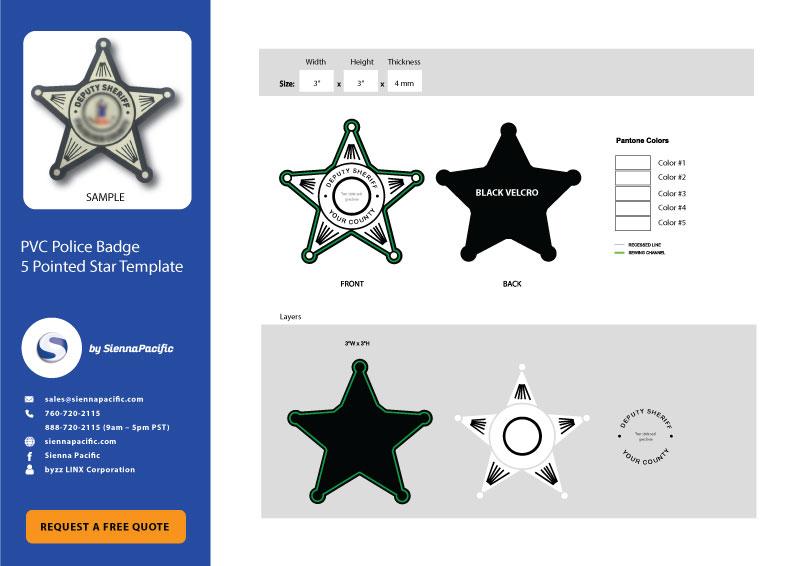
PVC Police Badge / 5 Pointed Star Template
As an essential component of law enforcement, a badge serves as both a symbol of authority and a means of identification. A PVC police badge adds durability to this important item, allowing it to withstand daily wear and tear without losing its appearance or function.
Our 5 pointed star templates provide a classic design that can be easily customized with department information, ensuring that officers are easily recognized while on duty. Made from high-quality PVC, our badges are designed to last for years to come. Trust in our product to aid you in your duty and uphold the honor of the badge.
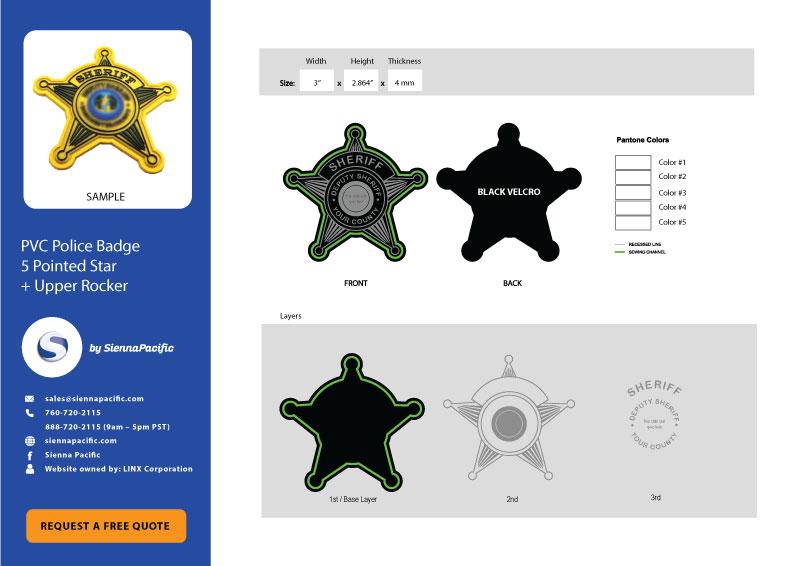
PVC Police Badge / 5 Pointed Star + Upper Rocker
This other 5 pointed star Police Badge template includes all the necessary design elements for creating a professional badge. The base layer provides a solid foundation for the star shape, with text placeholders for personalization.
The state seal placeholder adds an extra touch of authenticity and can easily be swapped out for any state or agency logo. By default all our pvc patches come with a sewing channel, we always recommend not to get rid of it even if you are thinking in ordering them with a velcro backing.

PVC Police Badge / 5 Pointed Star + Bigger Upper Rocker
When it comes to police badge designs, every detail counts. That's why the PVC police badge from Sienna Pacific stands out from others on the market. The five pointed star and bigger upper rocker add a bold, authoritative touch to this variant of the traditional design.
Made from durable PVC material, this badge is built to withstand daily wear and tear with ease. And with a high attention to detail and crisp graphics, this badge commands respect and professionalism. Trust in Sienna Pacific for all your law enforcement badge needs.

PVC Police Badge / 6 Pointed Star + 2 Upper Rockers
A PVC police badge template in the shape of a six pointed star with two upper rockers is another option for law enforcement officers. This vector design template is made specifically for soft rubber PVC which is a durable material, ensuring that your badge will maintain its shape and design for years to come.
Whether you are creating a new badge or replacing an old one, this PVC police badge template is a reliable choice. With its sleek design and customizable features, it serves as the perfect way to showcase your authority and dedication to the field of law enforcement.

PVC Police Badge / 6 Pointed Star Template + Upper and Lower Rockers
This PVC police badge template features a traditional six-pointed star design, with space for upper and lower rocker text. Made from durable PVC material, these patches are perfect for withstanding daily wear and tear.
These patches can also be customized with your department's name or logo for an even more personal touch. So why settle for a generic badge when you can have a unique PVC patch that represents who you are as a officer? Order your custom PVC police badge today.
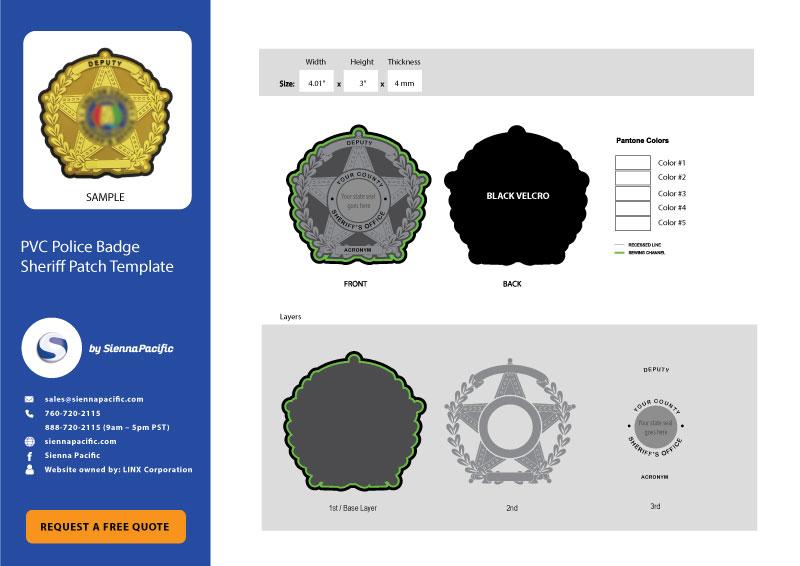
PVC Police Badge Sheriff Patch Template
What makes this template unique is its unique laurel wreath shape surrounding a classic sheriff star. The text rockers provide ample space for customizing with your state or county name, and the lower one is perfect for displaying the state acronym.
The template also features a blank circle in the center, ready to be personalized with your state seal. Whether you are designing badges for police officers or wanting to add a unique patch to a jacket or backpack, this template offers a professional and eye-catching design. It is sure to make a statement and show pride in your state or county's law enforcement.
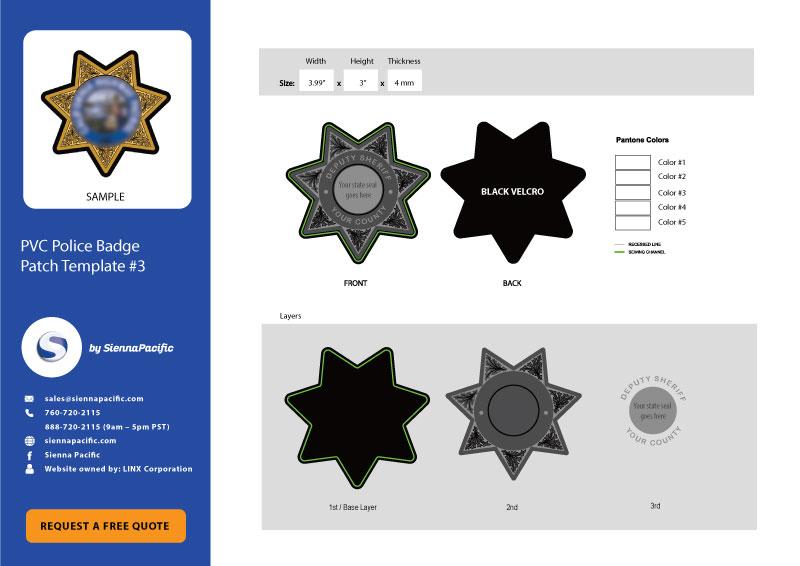
PVC Police Badge / 7 Pointed Star Patch Template
This other vector file includes a one of a kind 7 pointed sheriff star with a beautiful decoration and 2 easy to use upper and lower rockers text placeholders ideal when looking for the minimum amount of text and a minimalistic badge.
Take a look at the sample to know how you can get the most out of it choosing contrasting complementary colors to make a long lasting impression and help people identify the officers rank easily.
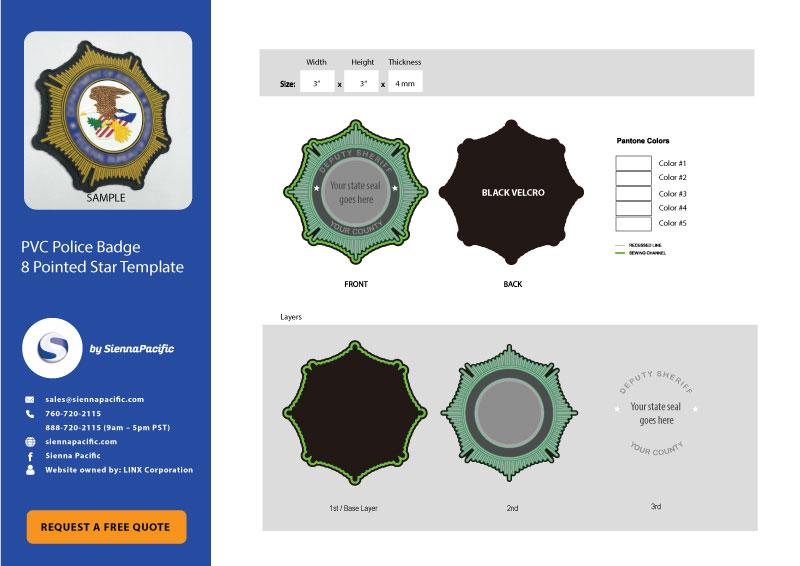
PVC Police Badge / 8 Pointed Star Template
Easily downloadable as a vector file in PDF format, this template allows for customization of text, colors, and size.
We always recommend our customers to save the file in .ai, .svg or .cdr for your records, and use the PDF to request quotes for your next batch of embroidered, woven, or PVC patches. Our template ensures that creating your perfect badge design is quick and hassle-free. Start designing now with our police badge template.
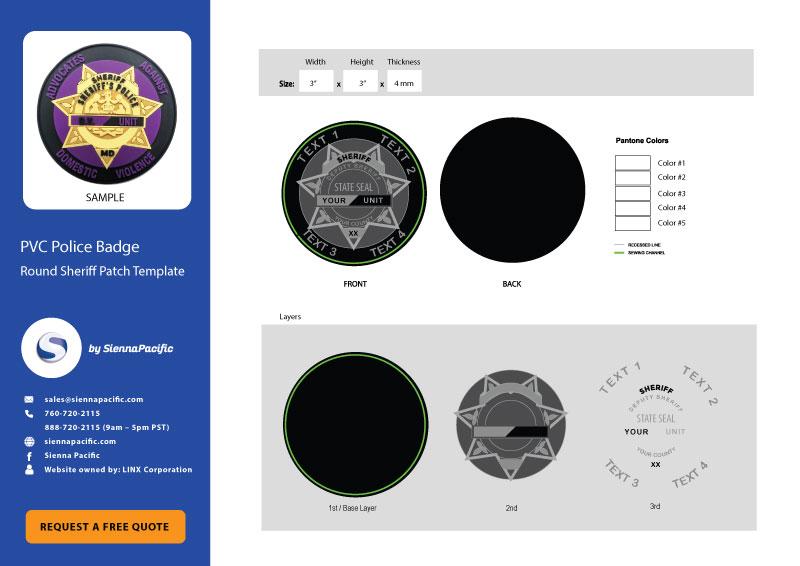
PVC Police Badge / Round Sheriff Patch Template
This vector template we are giving away today is a round patch with a seven pointed star in the middle. This design is ideal for customers who need to include more information in their badges.
Sometimes police departments want to add a message additional to the basic information, in the provided sample they use it to focus in one special mission: "Advocates Against Domestic Violence".
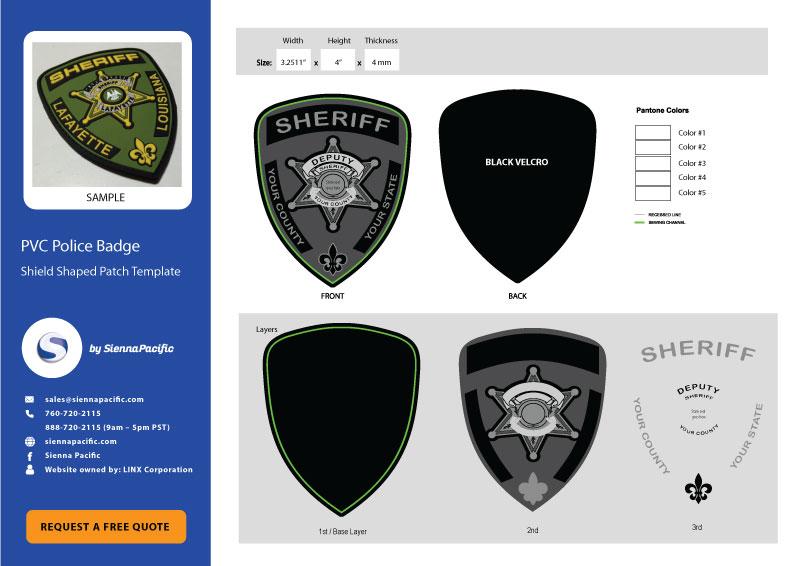
PVC Police Badge Shield Shaped Patch Template
The template, as the others, is made in vectors and it suitable to be oppened and adited in Adobe Illustrator, Corel Draw, inkscape or in any other kind of vector editing app. It includes a 6 pointed sheriff star in the middle along with 6 text placeholders.
Again, we have to insist, when customizing it change colors using a contrasting criteria. In the sample they used yellow text over black background. The combination as you can imagine, make the text in uppercases stand out and assure officers will be immediately recognized by the citizens.
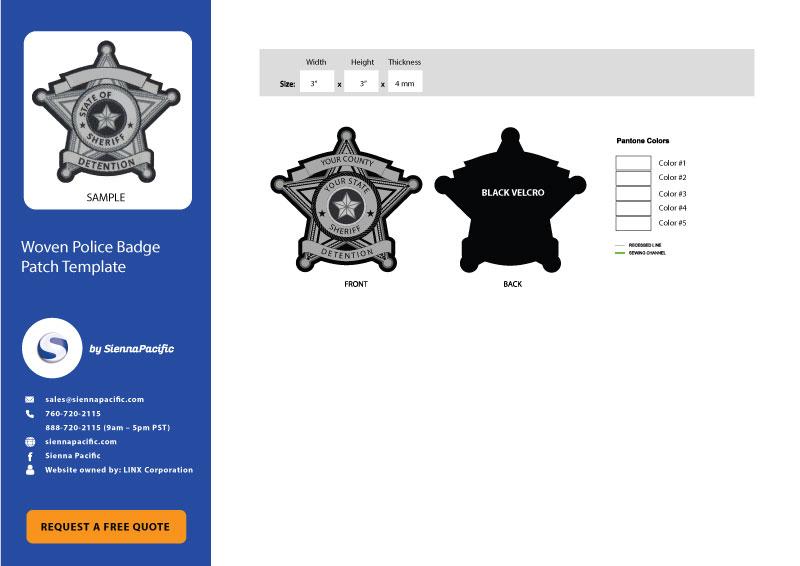
Woven Police Badge Patch Template / 5 pointed star, 2 rockers upper and lower
The woven police badge patch template by Sienna Pacific features a traditional 5-pointed star design with two rockers at the top and bottom. This design is perfect for police departments or any organization looking for a professional and iconic symbol of law enforcement. Made from high quality materials, this patch is durable and long-lasting.
The woven design adds texture and dimension to the patch, giving it a higher level of detail than traditional embroidery. Whether used for uniforms or as a collectible item, this template offers a timeless representation of the brave men and women in law enforcement. Order yours today from Sienna Pacific.
https://www.siennapacific.com/blog/tips/sheriff-badge-design-templates/?feed_id=499&_unique_id=634f3be8d7c0bFriday, October 7, 2022
How to design a patch usign our free templates
 https://youtu.be/SjDgPlcszEc
0:00 - Content summary
Narrator (off screen):
In this tutorial we are going to show you how to design a custom patch using free templates made by Sienna Pacific, that anyone can easily download from our website.
We will be working on adobe illustrator,, starting from a logo in .jpeg or png format, and we Will learn how to vectorize it or how to trace it.
Later on, we will see the template options, we will choose a particular shape, place and align the vector image. We will learn how to change colors according to our brand colors, how to convert text to curves, and finally how to export the design and how to submit it for a free quote on siennapacific.com.
0:45 - Intro
INTRO
Hi guys! This is Daniel from Sienna Pacific and I’m very excited today because we are giving away something very valuable for any person looking to make patches which is our Patch Design Template.
Today we will go through all the process of designing and making a one of a kind patch from 0 to 100%. So if you have no experience with any vector design program I guarantee you that by following our step by step process you will be able to come-out with a really decent design.
In Sienna Pacific we offer graphic design services. So If you don't want to invest time in learning this you can always count with us and let Sienna Pacific’s professional graphic designers do this for you.
And that being said…Let’s Get Started!Well without further delay…Let’s Get Started!
1:45 - How to download our Free Patch Design Templates
Let's start by downloading the template. Just go through the link that we left in the description and it will take you to this page where you can download the template document which is a pdf with vector images, as you can see. You can save it here. But I have it already in this folder.
Now, In order to be able to edit this document we will need to have a vector editor program already installed in our computer. These can be Adobe illustrator, Corel Draw òr Inkscape just to name a few. This last one Inkscape is free but you won't be able to edit the curved text of our template although as all softwares it is easy to get familiar with the interface once you start working with it. However In this video tutorial we will show you how to edit our template using Adobe Illustrator.
2:24 - Opening the template in PDF with illustrator
So open the template with illustrator
2:54 - Unblocking layers
Unblock layers. Once you open the document you will notice that you cannot click on any element and this can be frustrating but it is made for safety and you just have to go and open the layers window and unblock them all.
3:18 - Choosing the right Patch Design Template for your project
Then go and choose the template shape that is more suitable for your project. For instance, if I have a round logo I can use one of these first round patch templates, as you can see you can edit the text on these rockets, but we do not recommend to start working here but to select and copy the one you choose to another document as we are going to do very soon. Ok let's see what else we have here. Then we give you six types of square patches template. If my logo or design is horizontal maybe it will be a better choice to choose this second group of patch templates. These are also good for 1 inch square ranger eye patches or for pvc labels as well.
Then in the next page we have a third group of patch templates, that includes six type of shield shaped patches ideal for police badges or law enforcement badges such as sheriff, rangers, fire departments, EMS companies or private security services.
And, in the following page we have six other types of patches, these ones all have in common their tombstone shape ideal for shoulder patches to identify law enforcement or even for military shoulder patches of any military corps such as marine, navy, coast guard, air force or space force.
And last but not least we have the wedge shaped patch designs that are typically used not only for sports teams but also for park rangers, boy scouts, and to identify personnel who work at national parks and they are also suitable for the military, police and law enforcement.
As you can see this is all what our free patch design templates include so far, you have plenty of options to choose from and if you have any doubt here at the bottom of the page you can find our contact information, you can either send us an email or call us directly to ask for more information.
5:34 - Warning about the use of some elements as the base layer and the sewing channel
Each patch template includes the black background which is the base layer and the sewing channel. We do not recommend messing with these elements. You can change size but always group all the elements first prior to enlarging or shrinking the patch template to adjust it to a certain size you want.
But as we said before, do not edit the template here.
5:56 - Taking the chosen patch template to a new project.
Ok. you already know what your options are and you have to choose one. For this first example we are going to choose the first one. We have to be sure we are using the selection tool. Draw a square around the template you choose, group it with cntrl g , then copy it with cntrl c, go to file, open a new document, select a document format, we are going to choose an A4 sized canvas and we are good to go. Once we have created our new document we can paste our template and we will center it using our align toolbar.
7:22 - How to trace an image in illustrator. (Image to vectors)
Ok now we are going to open the folder where we have our logo or the image we want to print or reproduce on our patch. This can be a jpeg or png, in the case you dont have the vector file of your logo or artwork, if you do have it please skip all the following part where we are going to explain how to vectorize your logo using adobe illustrator.
Otherwise if you do not count with your art design or logo vectorized please stay with me because I am going to show you how to transform it into vectors.
Otherwise, if you do not count with your art design or logo vectorized please stay with me because I am going to show you how to transform it into vectors.
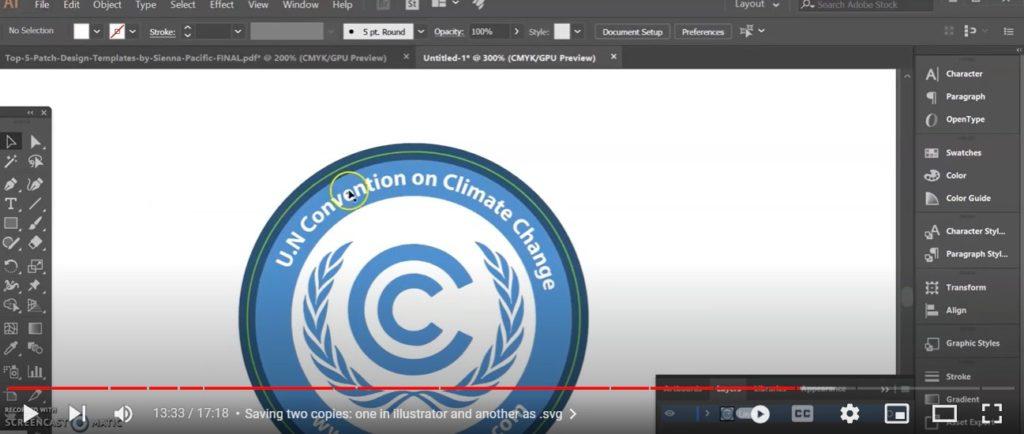
Select your image, drag it and drop it into your illustrator project. For this example we are going to use a United Nations Climate Change logo which is in the public domain and we think it will look nice framed in this round patch template we chose. Well drag and drop it, once there select it with the selection tool, shortcut letter v on your keyword. Select the raster image you just imported and press image trace in this top tool bar menu or panel you will see when the image is selected.
Depending on the type of logo or image you have you will need to choose a different tracing mode. If it is a logo it usually won't have more than 16 colors. Most of the time a 3 colors or 6 colors tracing mode will be enough for logos.
Wait a little, and once the process is done you have to press the expand button in order to convert tracing objects into paths.
Afterwards if your image is a png image with alpha background or invisible background you might be ready to go, but it is most likely that your image be a jpg and have some kind of background, whether white, black or of any other color. If this is your case you will have to ungroup it, keyboard shortcut ctrl U, select the background and delete it.
The most of the times, like in our case, you will have to clean up your vector art after deleting the background, zoom in to check out for little undesired vectors in order to remove them all. And in the case your traced image has too many vectors you will have to simplify it.
Then with the selection tool select drag you mouse to draw a square around your logo, group it and you can either copy paste it or drag it to the place where you want it to be. You can also use the align tools to take it directly to the center of your canvas. Ok now you have your logo or artwork in vectors placed inside our patch design template and maybe you will want to make some other changes like adding some text.
10:21 - How to edit the text placeholders
Double click on the text element to edit them or click on them with the text tool. There you can write whatever you want. It could be the name of your company or organization, a quote, whatever. For this example we are going to write U.N Convention on Climate Change. We can adjust the size, color or font using the options in the object type panel. Let-s edit the other one, on the bottom of the design. It can be yourwebsite.com or any other thing that better suits your patch project.
11:01 - Using the eyedropper tool to copy colors from your logo
Later you may need to change the color of your background. For this we recommend you to use the eyedropper tool with which you will be able to easily copy a certain color to another element. To use it first select the element you want to change the color, in our case it will be our background, then We can choose this tool selecting it from the tool panel or call it using the keyboard shortcut letter i., once using the eyedropper tool pick a color from you logo or design and the color of the element you selected will automatically change. If you want a darker blue for instance you can go to the color tool and drag it to the dark side. This way you will be using a color in the same gamma of your logo’s color scheme.
12:08 - Changing the size of your patch template with the transform tool
What else? We can also adjust the size of our patch. For this with the selection tool drag again the pointer to draw a square around your patch template. Cntrl G to group it and then adjust size whether dragging down or up the group, or by using the options in the transform tool window.
If the units format is in points and you want to set it to inches for instance you will need change the setting by going to the main menu, edit, preferences, units and change units to inches.
13:02 - How to outline text before exporting
Well there you have a very decent patch design ready to be sent to request a quote using our inbuilt webform. Lets do it.
But first , before exporting it we need to transform our text to curves. This is specially necessary if you are using a special font that you have installed. Because if you dont transform your text to curves and we doesnt have that type of font installed we will lose the format. To convert text to curves select your text element, then press right click on it and select the option create outlines, you can also call this function using the shortcut Shift +cntrl +O If you have a lot of text and want to transform all of them at once, You can alternatively go to select in the main menu, then object, then Select All text objects and then go to object in the main menu, path, outline stroke.
13:30 - Saving two copies: one in illustrator and another as .svg
Once this is done you will have to save the document press, cntrl s. You can save it as an illustrator project but also as an svg project, or pdf with editable mode. We recommend you to save a copy for you in illustrator and then save it again in .svg or pdf format for requesting a quote.
Lets do it.
14:33 - How to request a free quote for your Custom Patches with Sienna Pacific
Now we have the two documents with our patch design ready to be uploaded. To request a free quote with Sienna Pacific go to siennapacific.com. Navigate to the custom patches page in the main menu and press request a free quote or scroll down in the page until you find it. Once here fill out the quote form with your personal information. Name, your email, select a patch style we offer soft rubber pvc patches, embroidered, woven or leather patches, choose the amount of patches you want, our min. your quantity is 100 pieces only. Input your phone number, this is mandatory. Input your patch size , the width and height. Choose the country where you are located. If you are choosing a fabric patch such as embroidered or woven you can choose between two different kind of borders, merrow border and laser cut. Then you have to choose a backing for your patch. Iron on is not available for PVC Patches, for these type of patches you can choose between velcro or plain backing, On the other hand if you are choosing a embroidered or woven patch you can choose iron on, velcro, peel and stick or plain backing.Right below we can choose how fast we need our patches. And finally here we will be able to upload our patch design. Lets do that. And last but not least we have a field to write down any kind of additional information you might think it is necessary for us to better understand your order or what you are looking for specifically.Press the big button that says Price my patches and you will be ready. We will get back to you by email in less than 24 hours with your quote ready for you to take a final decision or to compare prices.
16:42 - Closing
Well this is it guys. In the next videos we will be experimenting with other templates, the square ones, the shield shaped, and so on. We hope this was helpful and if you like it, you know follow us, give us a like, or activate the notifications bell for be updated with our latest videos. This was Daniel from Sienna Pacific Custom Products Made easy.-
https://www.siennapacific.com/blog/tips/how-to-design-patches-with-free-template/?feed_id=462&_unique_id=634082d6baceeThursday, September 15, 2022
10 Ways to use Custom Patches to promote your Business

There are many different ways to use patches to promote your business. In this blog post, we will discuss 10 of them. Patches can be a great way to increase brand awareness and grow your customer base. They are also a fun way to show off your company's personality. Whether you are in the fitness industry, the healthcare industry, the construction industry, or any other industry, patches can help you promote your business!
Custom Patches to promote your Company in 10 different Industries

Crossfit and Fitness Gyms
In recent years, custom patches have become a popular way to show support for various causes and organizations. Now, companies like Sienna Pacific are making custom patches for fitness enthusiasts and gyms. These patches can be attached to workout clothes, gym bags, or even water bottles. And they're a perfect way to show off your passion for Crossfit, weightlifting, or other forms of exercise.

Healthcare Industry
In the healthcare business, there are many different types of patches that are used for identifying medical personnel and gear. Patches can be made from a variety of materials, such as cloth, vinyl, or leather, and they can be affixed to clothing with Velcro, iron-on, or self-adhesive backing.
We offer a wide range of stock patches that can be imprinted with a facility's name or logo, as well as custom patches that can be designed to meet specific needs. In addition to their use in identifying medical staff, patches are also often used to mark equipment, such as defibrillators and oxygen tanks. By clearly labeling all personnel and equipment, Sienna Pacific provides an essential level of safety in the healthcare setting.

Construction Companies
A construction company patch is a piece of fabric with a design or logo that is typically affixed to the clothing of construction workers. Construction company patches can serve a number of purposes, including helping to promote brand awareness and fostering a sense of pride and unity among employees.
In addition, construction company patches can help to distinguish workers from those employed by other companies, making it easier for customers and clients to identify them. For these reasons, construction company patches can be an valuable marketing tool. When designed and used effectively, they can help to increase brand recognition, build customer loyalty, and boost employee morale.
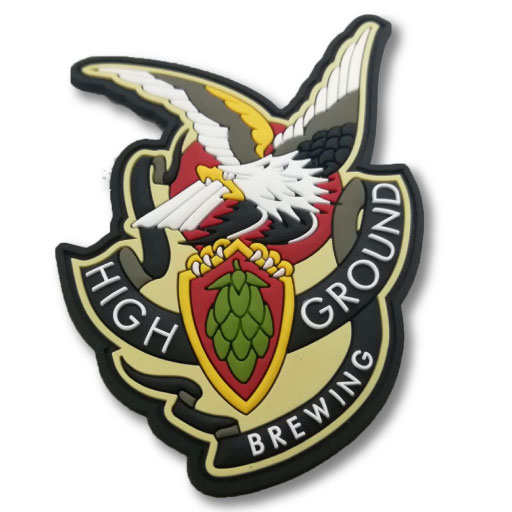
Brewing Business
In the brewing business, it's important to have a recognizable brand. Custom logo patches are a great way to promote your business and make sure that your brand is visible. Logo patches can be ironed or sewn onto hats, jackets, vests, or other promotional clothing.
They are an affordable way to get your brand out there, and they can help you stand out from the competition. Patches are also a great way to show off your company's sense of style. A well-designed patch can convey your company's personality and give potential customers a taste of what your business is all about. So if you're looking for a creative and affordable way to promote your brewing business, consider using custom logo patches.

Airsoft Field or team
These patches can be designed to feature your business logo or other branding elements, and they can be attached to bags, clothing, or other gear. Hook and loop patches are a cost-effective way to promote your airsoft field, and they can help you to reach a wider audience. Contact a reputable patch manufacturer to learn more about how you can use custom velcro patches to promote your business.

Paintball field or team
Paintball fields can also use custom patches to promote their business. Patches can be placed on paintball guns, masks, or even jerseys. This is a great way to show off your company's personality and increase brand awareness.

Surf Related Brands
Surf brands can use custom patches to promote their business. PVC Patches are waterproof and can be placed on wetsuits, swimsuits and other surf related apparel. As a result, custom patches can be a powerful marketing tool for any surf brand.
Music Industry
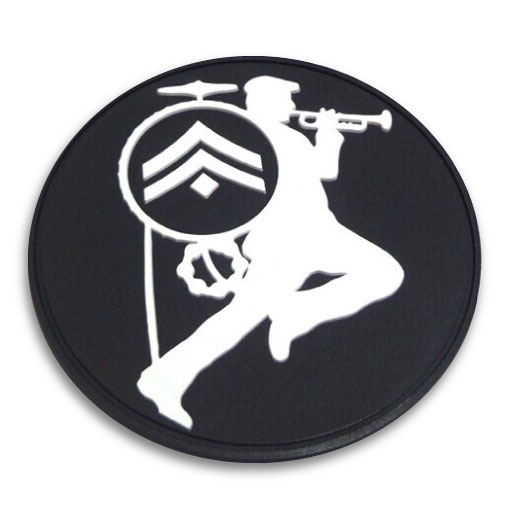
Custom patches are a great way to promote your band, music brand, or music festival. Patches can be ironed or sewn onto clothing, making them a versatile and affordable marketing tool. When designed correctly, patches can help you to build brand awareness and create a lasting impression with your fans.
To get the most out of your custom patches, consider the following tips. First, choose a patch size and shape that will make an impact. Second, use high-quality materials to create a patch that will last. And third, work with a reputable patch manufacturer like Sienna Pacific who can help you to create a custom patch that meets your specific needs. By following these tips, you can create custom patches that will help you to promote your band, music brand, or music festival in a professional and impactful way.

Martial Arts Schools
First of all, patches can help to distinguish different levels of achievement within a school. For example, a student who has earned a black belt can wear a patch that shows their rank and accomplishment. This can be a source of pride for the student and also help to motivate other students to achieve their own black belts.
Additionally, personalized patches can help to promote a sense of community within a martial arts school. By wearing the same patch, students can show that they are part of the same team and share a common goal. Finally, personalized patches can simply be a lot of fun. They offer a way for students to express their individuality and show their personality. For these reasons, martial arts schools should consider investing in personalized patches.

Law enforcement Agencies
Patches can help law enforcement agencies in a number of ways. First, they can provide a quick and easy way for agencies to identify their employees. Second, they can help promote team unity and esprit de corps. Third, they can be used to raise funds for charities or other causes that are important to the agency. Finally, they can help increase public awareness of the agency and its work. In short, patches can be a valuable tool for any law enforcement agency.

Fashion and Apparel Business
In the fashion and apparel business, custom patches are a popular way to add a personal touch to clothing and other products. Patches can be used to promote a brand, show support for a cause, or simply to express a unique style. When ordering custom patches, it is important to work with a reputable company that has experience in the fashion industry. This will ensure that the patches are made to the highest quality standards and that they will stand up to wear and tear. With a little bit of planning, custom patches can help take any fashion or apparel business to the next level.
As you can see, there are many ways that you can use custom patches to promote your business. Whether you are in the fitness industry, the healthcare industry, the construction industry, or any other industry, patches can help you promote your business! So what are you waiting for? Get started today!
Related Posts

Monday, August 15, 2022
How to Trace an Image in Illustrator
 Today we just wanted to recap about How to Trace an Image in Illustrator
Have you ever seen an image online that you loved, but couldn't find a way to save it? Maybe you wanted to use it as the background for your phone or computer, but couldn't figure out how to save it? Today, I'm going to show you how to trace an imag...
Read more:
https://www.siennapacific.com/blog/tips/how-to-trace-an-image-in-illustrator/?feed_id=314&_unique_id=62fa5cce7568e
Tuesday, August 9, 2022
How do I choose the right backing for my custom patch?
Iron-on, velcro and adhesive. It is impossible to customize a patch to your liking. But don’t worry, we offer them all! Different backings serve different purposes and you will have to decide whether to have permanent or temporary placement.
So, let’s talk about choosing the right backing for your patches.
What is Patch Backing?
The term patch backing refers to any material that is added to the back of the patch. While it’s not always necessary, it can be of help during manufacturing, handling, attaching or removing the patch onto the item.
7 Types of Patch Backings
When you purchase your patches, begin PVC, Embroidered, Woven, Leather or Printed patches, you will need to attach them to your items. The backing on your patches will accomplish both the functions of a facilitator of this task.
No Backing
Some materials like PVC, are sturdy enough that do not need the addition of a material to make it strong enough to be manipulated or attached to a piece of clothing. Some people might prefer it, for example if they are going to sew them or glue them on to their item.
But for the majority of patch styles, having a piece of material on the back will give it more substance that will make them easier to manipulate and attach.
Due to the softness of fabrics used on embroidered patches, they cannot even be manufactured without adding a piece of material onto the back, such as paper or vellum.
In our organization, a patch with no backing is called a label.
PVC or Plastic backing.
Plastic backings are the kinds of backings that most patches use. It helps to stabilize the patch's structure throughout its lifecycle.
It's recommended for uses such as law enforcement uniforms, where we want to emblem to have ”presence” and not look like a bendable, wrinkled element. It also helps during the sewing process, as it will make the patch stay in its desired place. Plastic give patch stiffness as well as helping it to maintain the shape over time.
Iron-On Backing
This paid option is great when you don't have to change patches between different garments.
Iron on patches has a shiny backing which doesn't become attached when heated so it doesn't get sticky on the skin. Sometimes patches have a tape backing that is adhesive, but these types are not permanent and are only recommended in situations where the patches are needed.
Adhesive Backing
Adhesive backings: The glue is pressed on a piece of paper and overlapped on a piece of paper. The adhesive backing may be an indefinite choice in fabrics and garments and it is ideal for only certain types of events.
Hook and Loop Backing
Hook and loop backing is very popular for patches that will be used in the military, and are popular in police forces. It's made of a small hook and loops similar to the rough side on velcro to give secure attachments to the soft backing and supports the patch.
How do hook and loop patches work?
The hooks and loops secure on each side use threads that attach them together. When the components are attached as hooks faster in the loop, the pieces become fast attached creating an effective, but temporary grip.
What is the best material to put patches on?
Iron on patch works better on t-shirts made of cotton/polyester mixtures. Shirts in polyester and nylon are not suitable for use as they may cause heat and may cause burns. Vinyl or leather will not give the same quality results at all.
What material do you use to make embroidered patches?
The most popular material used for embroidered patches is Twill. It is sturdy enough to give the patch some consistency, while allowing a smooth embroidery process. The threads used in embroidery are also an important factor, ideally you want to use good quality threads that will not break or fray easily and it will not transfer colors to the item the patches will be attached to. We have found polyester to be the best material for our embroidered and woven patches.
How do you put Velcro on the back of a patch?
1:443:24.
https://www.siennapacific.com/blog/tips/best-patch-backing-types/?feed_id=299&_unique_id=62f340e845db2
Subscribe to:
Posts (Atom)